 Expora
Your health data, ready for the doctor's office .
Expora takes the numbers your iPhone and Apple Watch already collect and lays them out in a clean PDF you can print, email, or hand over at your next appointment. No spreadsheets, no screenshots, no fuss.

Built for iPhone. Your data stays on your device.
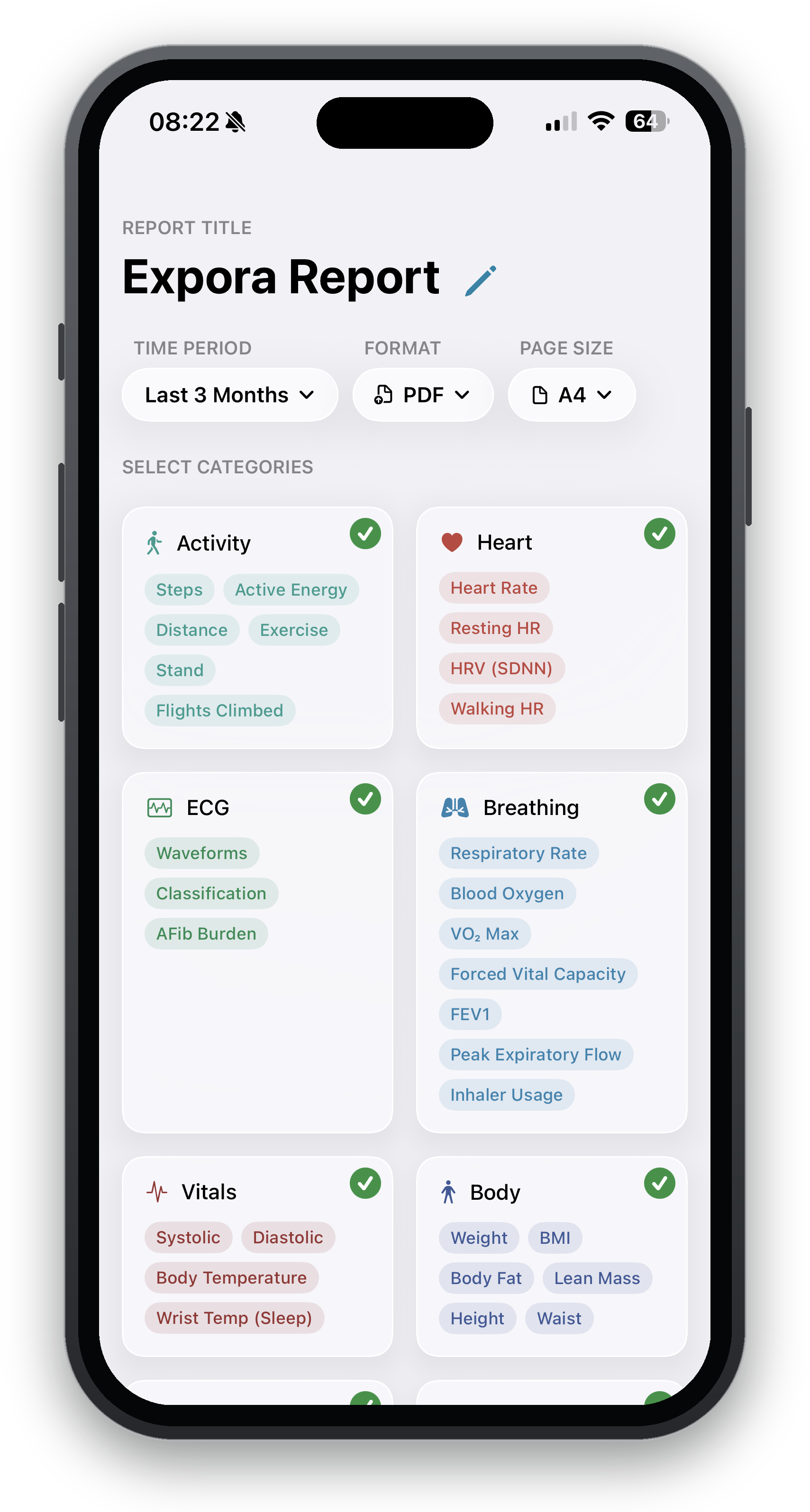
Three taps and you have a report
Most people put this off because pulling health history together is tedious. Expora does the boring part for you.
Pick a time period
Last week, last three months, last year, whatever your appointment calls for. Expora reads straight from Apple Health.
Choose your categories
Tap the things that matter for this visit. Leave out the rest. The report only includes what you select.
Export it your way
Save a polished PDF, sized for US Letter or A4 so it prints cleanly, ready to send or hand over. Need the raw numbers instead? Export the same report as CSV or JSON. That is the whole thing.
What it covers
Expora groups your metrics the same way Apple Health does, so nothing feels unfamiliar. Nine categories in all. Turn whole ones on or off, or fine tune the individual readings.
Activity
Heart
ECG
Breathing
Vitals
Body
Nutrition
Cycle
Sleep
Your data does not leave your phone
Expora reads from Apple Health on your device and builds the PDF right there. There is no account to create and nothing gets uploaded to a server. You decide who sees the report.
Questions people ask
If something is not here, get in touch and we will add it.
Where does Expora get my data?
From Apple Health. When you first open the app it asks permission for the categories you want to include. You can change those permissions any time in the Health app.
Do I need an Apple Watch?
No. Anything already in Apple Health works, including data from your iPhone, your Watch, a blood pressure cuff, a scale, or other connected devices. The more sources you have, the fuller the report.
Which formats can I export?
Three. A polished, multi-page PDF for sharing or printing, plus CSV and JSON if you would rather have the raw numbers for a spreadsheet or another app.
What page sizes can I export?
The PDF exports in US Letter or A4, and Expora defaults to the right one for your region. The layout adjusts to whichever you choose so it stays printer friendly and comes out clean on the page.
Is this a medical device?
No. Expora is a tool for organizing and sharing the data you already have. It does not diagnose anything or replace advice from your doctor.
Can I include only certain readings?
Yes. Toggle whole categories on or off, or pick individual metrics within each one. The report contains exactly what you choose and nothing else.